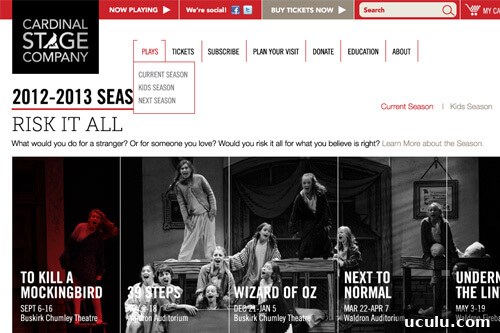
Custom menus work well for sitewide navigation, but sometimes you only want to show the subpages for the current section. In the example screenshot, the “Plays” dropdown displays three subpages, and those same subpages appear on the right because the user is viewing the Plays section.
There are a few common strategies for showing section-specific subpages:
- Use wp_list_pages() to dynamically list all subpages of the current section. This is simple but has limitations: it’s difficult to hide specific items, the page order must match the custom menu order to display consistently, and you can’t use custom labels for menu items. For example, a menu item labeled “Current Season” might actually be a page titled “2011-2012 Season”, while older seasons should be excluded from the submenu.
- Create a separate custom menu for each section. That gives full control but increases maintenance: adding a new section requires creating a menu, and editors must maintain many menus.
A practical alternative is to keep a single primary custom menu that contains all sections and their relevant subpages, then programmatically extract only the submenu items that belong to the current section. The WordPress function wp_get_nav_menu_items() allows you to pull items from a specific menu and filter by parent, so you can build a section-specific submenu that respects the custom menu’s order and labels.
Example implementation (keeps the site’s custom menu as the source and outputs only the current section’s subpages):
| /** |
| * Section Menu |
| * Displays the subpages of the current section |
| */ |
| function be_section_menu() { |
| // Only run on pages |
| if ( ! is_page() ) |
| return; |
| // Determine the section: if this page has ancestors use the top-level ancestor, otherwise use the current page |
| global $post; |
| $section_id = empty( $post->ancestors ) ? $post->ID : end( $post->ancestors ); |
| // Get menu locations and the menu assigned to the ‘primary’ location |
| $locations = get_nav_menu_locations(); |
| $menu = wp_get_nav_menu_object( $locations[‘primary’] ); |
| // Get items in that menu whose parent equals the current section ID |
| $menu_items = wp_get_nav_menu_items( $menu->term_id, array( ‘post_parent’ => $section_id ) ); |
| // If menu items exist, output a submenu |
| if ( ! empty( $menu_items ) ) { |
echo ‘
|
| $first = true; |
| foreach ( $menu_items as $menu_item ) { |
| $classes = ‘page-item’; |
| if ( $first ) |
| $classes .= ‘ first-menu-item’; |
| $first = false; |
| if ( get_the_ID() == $menu_item->object_id ) |
| $classes .= ‘ current_page_item’; |
| echo ‘
‘; |
| } |
| echo ”; |
| } |
| } |
| add_action( ‘genesis_before_loop’, ‘be_section_menu’ ); |
This approach gives you the advantages of the custom menu system—custom labels, order, and manual exclusions—while automatically rendering only the items relevant to the section a visitor is viewing. It reduces maintenance compared with creating a separate menu for each section and avoids the limitations of wp_list_pages().